




 Help Center
  Tutorials
  Download Center
 How to Download Videos from Dailymotion in 4K (Full Guides)
By Iris Holmes
Updated on Dec 07, 2025
24.7K views
5-min read
Dailymotion is a global video-sharing platform offering diverse content, from news to entertainment. If you have ever tried to download videos from Dailymotion, you know the frustration: the platform offers no direct download button for offline viewing unless you own the video or have special permissions.
But don’t worry, there are ways around this! In this guide, we will show you how to download Dailymotion videos in high quality with several effective methods available on Windows, Mac, Android and iPhone. Let’s dive in!
- 1. How to Download Videos from Dailymotion to MP4 4K on PC & Mac
- 2. How to Download Dailymotion Videos Online for Free
- 3. How to Download Videos from Dailymotion on Mobile
- Tip: Download Videos from Dailymotion Studio of Your Own
- FAQs About Dailymotion Video Download
- Comparison of Top Ways to Download Dailymotion Videos
- Final Verdict: Which is the Best Dailymotion Video Downloader?
1. How to Download Videos from Dailymotion to MP4 4K on PC & Mac
If you are looking for the easiest way to download Dailymotion videos in 4K, using a professional tool like TuneFab VideOne Downloader is your best option.
Unlike online tools or browser extensions, this Dailymotion video downloader for PC and Mac offers a faster, more reliable download experience, enabling you to save Dailymotion to MP4 and more formats while retaining the original quality from 720P, 1080P, to 4K. Besides, it is a versatile solution which helps you download videos from any website, including Dailymotion, YouTube, and OTT platforms.
Why Choose TuneFab VideOne Downloader?
- Supports MP4, MKV, and MOV formats to ensure compatibility with all devices.
- Keeps original video quality with up to 4K Dailymotion video download.
- Retains multiple audio tracks and subtitles in various formats (SRT, VTT, etc.).
- 3X download speed with advanced acceleration technology.
- Supports downloading videos from OTT services such as Netflix and Hulu and 1000+ websites such as TikTok and Instagram.
Next, let’s move on and learn how to download Dailymotion videos to MP4 4K with TuneFab VideOne Downloader:
Step 1. Set Up TuneFab VideOne Downloader
Download and install the latest TuneFab VideOne Downloader on your computer. Then, launch it.
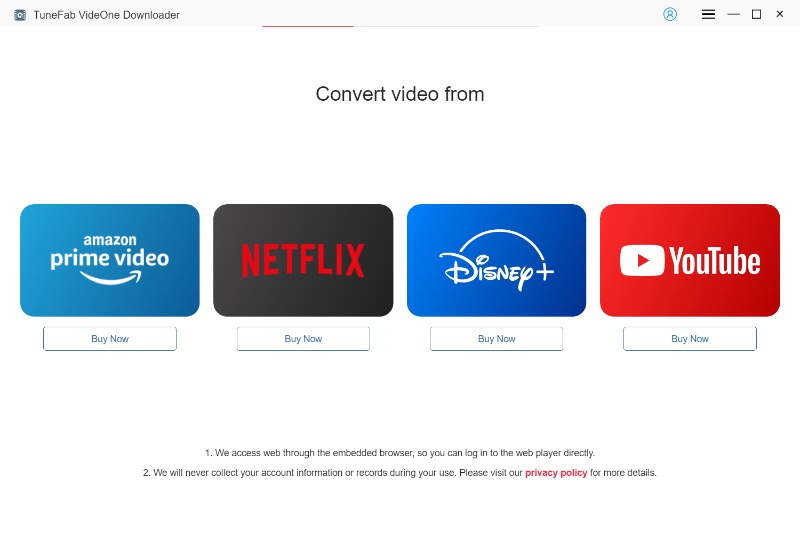
Step 2. Paste the Dailymotion Video Link
Go to Dailymotion and find the video you want to download. Copy its link, and then paste it back into the search bar in TuneFab VideOne.
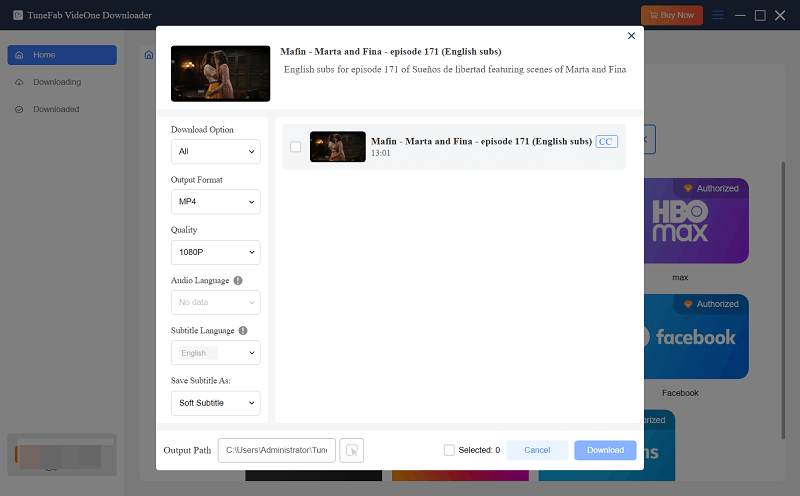
Step 3. Choose Output Format and Quality
Once the video loads, select the MP4 format and adjust the preferred quality in the pop-up window. Also, if you want to download Dailymotion videos with subtitles, you can also customize the subtitle language and type using the dropdown lists below.
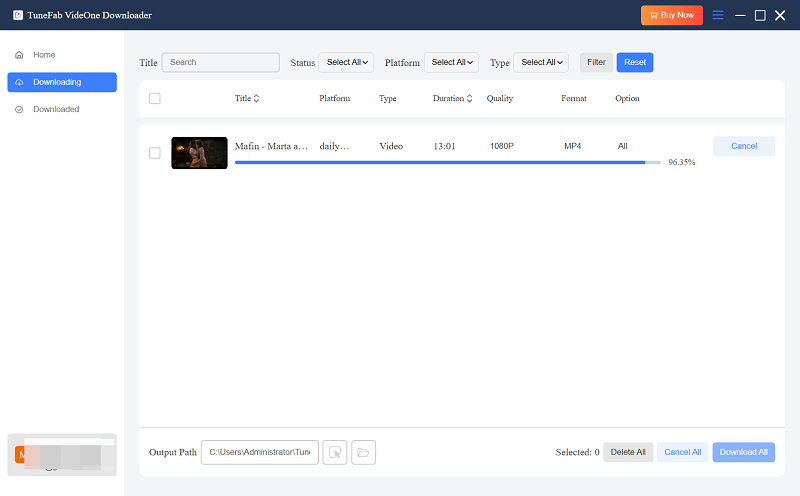
Step 4. Download Videos from Dailymotion to MP4
Click the Download button, and TuneFab VideOne will start saving your Dailymotion to MP4 HD files in seconds.
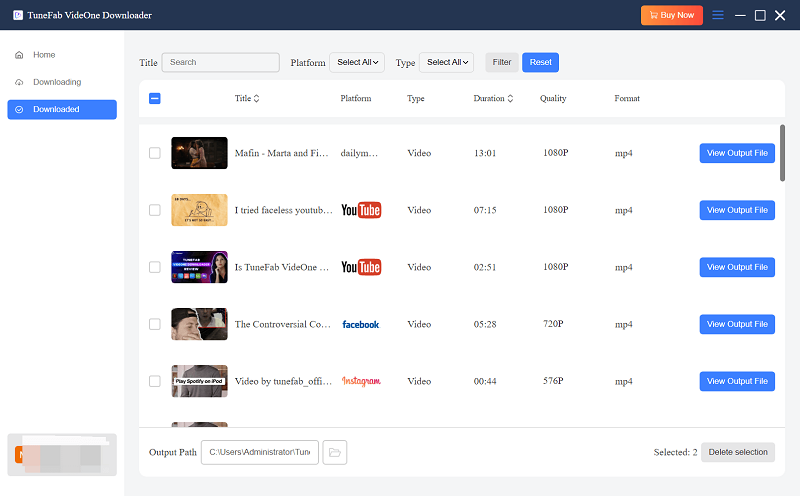
Step 5. Check 4K Dailymotion Video Downloads
Head to the Downloaded tab and click View Output Files. Then, you can navigate to the local saving folder and be ready to watch downloaded Dailymotion videos offline anytime, anywhere.
Related Download Guides You Might Need:
How to Download Reddit Videos to MP4
How to Download Pinterest Videos
How to Download Videos from Tumblr
2. How to Download Dailymotion Videos Online for Free
There are also a variety of online tools that can download videos from social media. In this section, we will show two viable free Dailymotion downloaders to let you save your favorite videos offline without installing software.
Method 1. Using Cobalt Tool
If you don’t want to install software, a Dailymotion online downloader like Cobalt Online Tool can help. It’s a free web-based downloader that supports multiple platforms, including Dailymotion, YouTube, SoundCloud, and Vimeo. With Cobalt, you can easily download videos from Dailymotion in different formats and quality levels without any installation.
Here is how to download Dailymotion Videos online by using Cobalt Online Tool.
Step 1. Visit the official Cobalt Online Tool website. Be sure to use the correct URL to avoid fake or unsafe sites.
Step 2. Find the Dailymotion video you want to download, copy its link, and paste it into the search box.
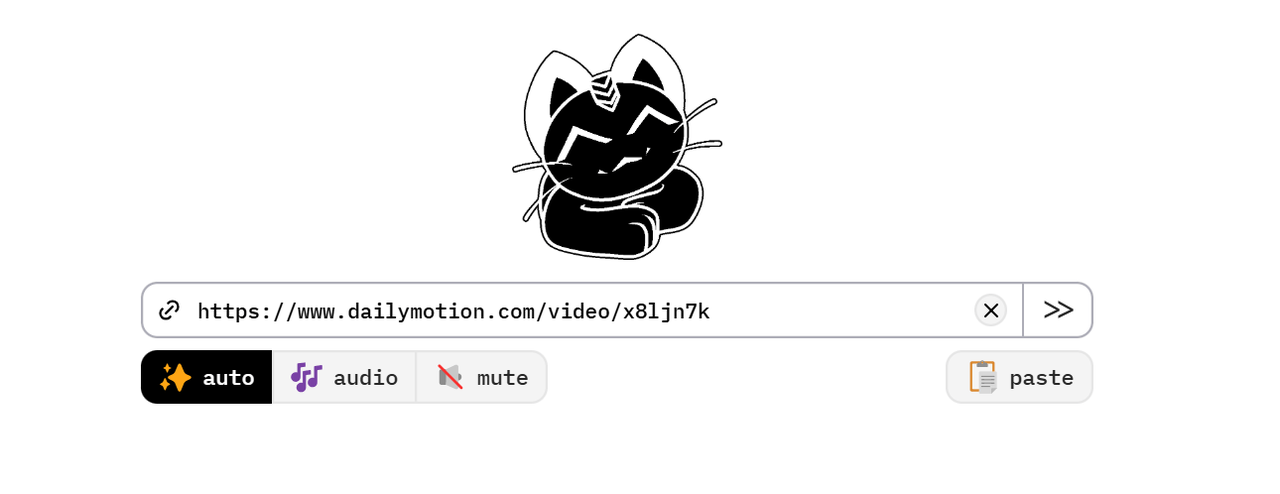
Step 3. Select whether you want to download a Dailmotion video free in MP4 or extract audio. Adjust the resolution to match your needs.
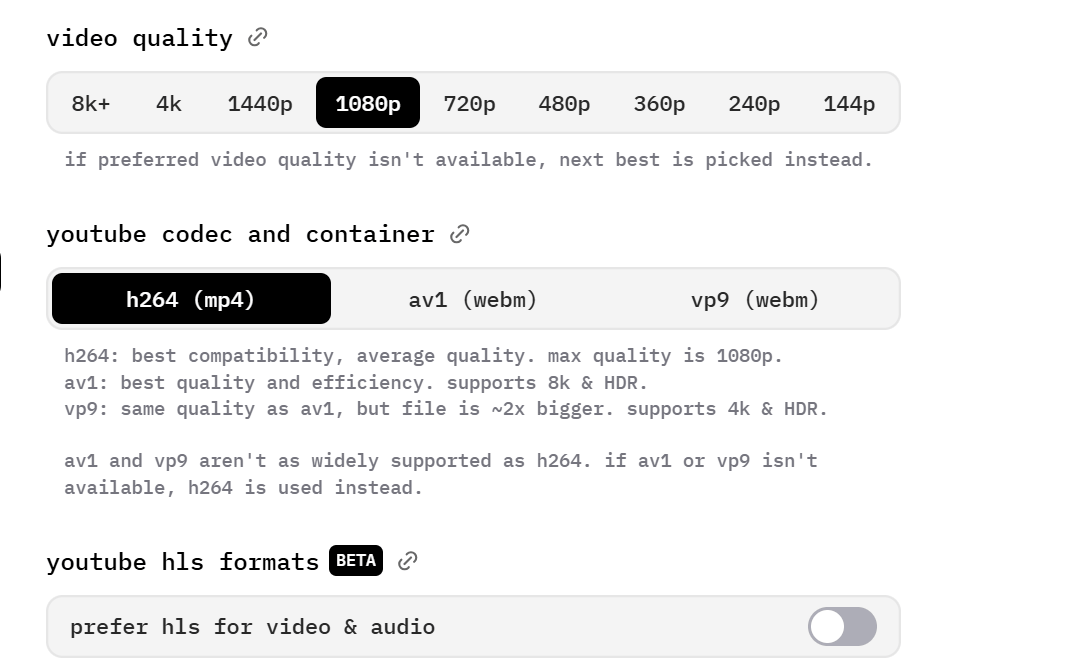
Step 4. Hit the Download button, and Cobalt will process your request. Once ready, click again to save the Dailymotion MP4 file to your device.
Method 2. Use dmsave Dailymotion Video Downloader Extension
Looking for a convenient way to download Dailymotion videos in Chrome without pasting links? dmsave Chrome Extension is a great choice. This handy Dailymotion video downloader extension adds a download button directly to the video page, eliminating the need to copy links or switch between websites. Just click and save!
Here is how to download Dailymotion Videos for free by using the dmsave Dailymotion Video Downloader extension on Chrome:
Step 1. Go to the Chrome Web Store and search for dmsave. Click Add to Chrome and install the Dailymotion video downloader extension.
Step 2. Visit Dailymotion and play the video you want to save. The extension will detect it automatically.
Step 3. A download video from social media option will appear on the video player. Click it to choose a format and resolution.

Step 4. Once the file is ready, click the final Download button, and then you can download a Dailymotion video for free with ease.
Note:
Free online Dailymotion video downloaders can be unreliable and may occasionally experience parsing failures or download interruptions. They usually support only basic MP4 formats and cannot guarantee high-quality output, subtitle preservation, batch downloading, or other advanced features. Therefore, if you want a more complete and stable download experience, a professional tool like TuneFab VideOne Downloader is a far better choice.
3. How to Download Videos from Dailymotion on Mobile
Downloading videos from Dailymotion on Android/iPhone for offline viewing is ideal when you prefer to watch offline on the go. Although the official app does not offer a download button, there are several simple workarounds. Below are the best methods for each device type.
On Android Devices
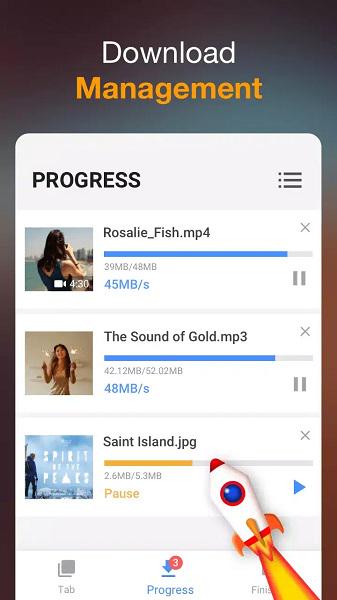
Video Downloader by InShot is a simple and effective Dailymotion video downloader app for Android. It can automatically detect playable videos on the screen, letting you download videos from Dailymotion on Android with one tap. Moreover, this free app also supports multiple formats (including MP4), pause/resume, and video previews, making the process smooth and user-friendly.
Next, let’s see how to convert and download Dailymotion videos to MP4 on Android with it.
Step 1. Go to the Google Play Store, search for Video Downloader by InShot, and install the app on your Android device.
Step 2. Access the Dailymotion video directly within its built-in browser, and then play.
Step 3. Once the Dailymotion downloader detects the video, a download button will appear. Tap it to proceed.
Step 4. Select the preferred video format, like MP4, and resolution before starting the download.
Step 5. Process Dailymotion downloads in MP4. After that, you can easily save Dailymotion videos to your Android SD card or Gallery for offline playback with ease.
On iPhone/iPad
Unlike Android, iOS has strict restrictions on third-party video downloading apps. To successfully save Dailymotion videos on iOS devices, you will need to use a file manager app with a built-in browser, such as Documents by Readdle, combined with a reliable online tool. However, please note that output quality depends on the online Dailymotion downloader you use, and very high-resolution (like 4K) may not always be available.
Next, let’s see how to convert and download videos from Dailymotion to MP4 on Android with it.
Step 1. Go to the Google Play Store, search for Video Downloader by InShot, and install the app on your Android device.
Step 2. Access the Dailymotion video directly within its built-in browser, and then play.
Step 3. Once the Dailymotion downloader detects the video, a download button will appear. Tap it to proceed.
Step 4. Select the preferred video format, like MP4, and resolution before starting the download.
Step 5. Process Dailymotion downloads in MP4. After that, you can easily save Dailymotion videos to your Android SD card or Gallery for offline playback with ease.
Tip: Download Videos from Dailymotion Studio of Your Own
If you’ve already uploaded some videos onto Dailymotion, you don’t need any extra tools to download them. Dailymotion Studio helps download your own videos directly from the platform and export them in the universal MP4 format by default. This is the safest and most reliable way to get your content in high quality. Here is how.
Step 1. Go to Dailymotion Studio and sign in with the account that uploaded the video.
Step 2. Navigate to Media > Videos to see a list of all the videos you’ve uploaded.
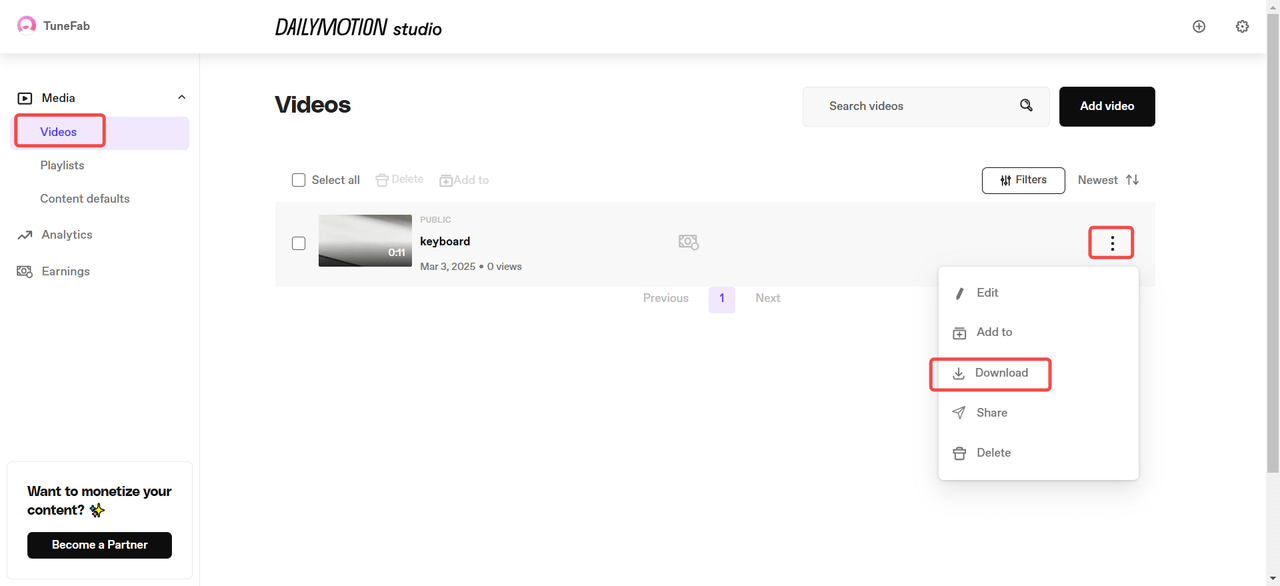
Step 3. Find the video, then click the three-dot menu next to it.
Step 4. Click Download, select your preferred resolution, and hit Download again.
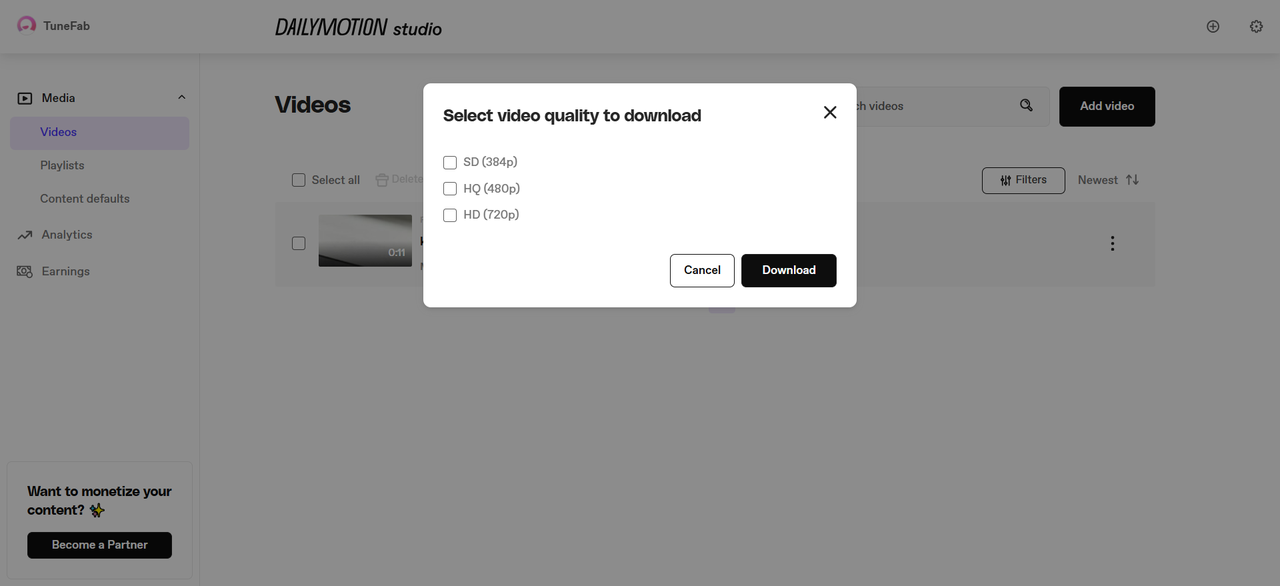
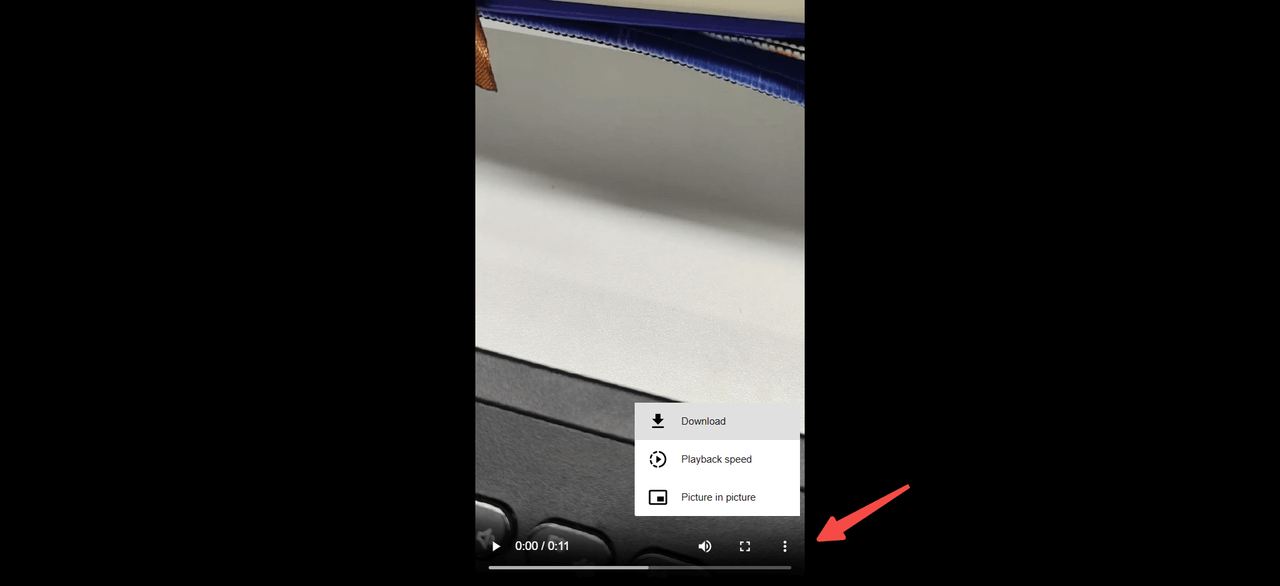
Step 5. On the download page, click the three-dot menu at the bottom right of the video, then select Download to save it to your device.
FAQs About Dailymotion Video Download
How to download Dailymotion private videos?
Downloading private Dailymotion videos is only possible if you have been granted access or permission by the video owner. Once permission is granted, you can use a professional Dailymotion video downloader like TuneFab VideOne Downloader to save it in MP4 format while maintaining the original quality.
How do I convert Dailymotion videos to MP3?
This is not something all tools can do. For desktop users, TuneFab VideOne Downloader is a viable solution. You can choose to download the audio only and select MP3 as the output format. This way, you can easily download Dailymotion videos as MP3s.
Dailymotion vs YouTube: What is the Difference?
YouTube and Dailymotion are both leading video-sharing platforms worldwide. Here’s a quick comparison highlighting their key differences:
| Dailymotion | YouTube | |
|---|---|---|
| User Scale | Smaller | Largest video platform globally |
| Content Focus | Higher focus on professional and journalistic content (news, full TV shows/movies). | Broader, diverse range. Emphasis on user-generated content, vlogs, and tutorials. |
| Video Resolution | Usually up to 1080P | Up to 8K HDR |
| Recommendation Algorithm | Less personalized | Highly tailored and personalized |
| Ads | Fewer ads, less viewing interruption | More ads, but skippable |
Regardless of the platform you prefer, TuneFab VideOne Downloader supports both. With it, you can download videos from Dailymotion and YouTube without any hassle.
Comparison of Top Ways to Download Dailymotion Videos
This article has introduced how to download videos from Dailymotion for PC, Mac, Android, iPhone, and online, covering professional desktop software, free online tools, browser extensions, and mobile apps. To help you quickly make an informed decision, here is a comparison.
| Features | TuneFab VideOne Downloader | Cobalt Tool | dmsave Chrome Extension | Video Downloader by InShot | Documents by Readdle + Online Tool |
|---|---|---|---|---|---|
| Work on | Windows, Mac | Web | Chrome | Android | iPhone, iPad |
| Output Format | MP4, MKV, MOV, MP3, M4A, FLAC, WAV | MP4 | MP4 | MP4, MOV, AVI, WMV, MP3, M4A | MP4 |
| Highest Quality | 4K | 1080P | 1080P | 4K | 1080P |
| Performance | Stable | Less Stable | Less Stable | Less Stable | Less Stable |
| Download Speed | 3X or faster | 1X | 1X | 1X | 1X |
| Batch Conversion | ✔ | ❌ | ❌ | ✔ | ❌ |
| Subtitle Support | ✔ | ❌ | ❌ | ❌ | ❌ |
Final Verdict: Which is the Best Dailymotion Video Downloader?
All methods mentioned above can help you download videos from Dailymotion, but some may have limitations like restricted download options, slower speeds, or lower video quality.
For the best experience, we recommend using TuneFab VideOne Downloader. This tool lets you download videos from any website in high quality, supports multiple formats, and offers fast speeds. If you want a reliable and efficient way to save your favorite Dailymotion videos in MP4 for offline viewing, TuneFab VideOne is the perfect choice. Click the download button below and try it yourself!