




 Help Center
  Tutorials
  Download Center
 Download Videos from Tumblr: Best Free Tools & Easy Methods
By Iris Holmes
Updated on Jan 09, 2026
24.2K views
5-min read
Downloading videos from Tumblr isn’t as straightforward as it might seem. Unlike many platforms, Tumblr doesn’t provide a built-in option to download videos for offline viewing, which can be frustrating when you want to save a clip you like.
The good news is that Tumblr videos are still downloadable with the help of third-party tools. By using the right methods, you can save Tumblr videos in common formats such as MP4 and watch them offline on your own device. In this article, we’ll walk you through four effective ways to download videos from Tumblr, covering different tools and use cases so you can choose the method that works best for you.
You May Also Like:

Part 1. Best Tool to Download Tumblr Video (Recommended)
For desktop users, the top 1 Tumblr video downloader you should definitely not miss can be TuneFab VideOne Downloader. The software directly embeds a built-in web browser, which can let you access all online video resources to process the video download without any limitations. It can ensure good stability to ensure a high conversion success rate, to improve downloading efficiency.
At the same time, TuneFab VideOne Downloader can keep lossless video as well as audio quality (at up to 4K) to save Tumblr downloads for you, making sure that the downloaded videos can bring you a good streaming experience, or be used for editing your own video projects. TuneFab VideOne Downloader will not add any watermark while downloading videos from any websites even if you are using its free trial!
Key Features:
- Directly accesses Tumblr videos to download offline in common MP4, MOV, or MKV formats
- Keeps lossless video quality (up to 4K) to save videos from Tumblr at the best conditions
- Detects original subtitles and audio tracks to download with Tumblr videos together
- Supports accelerated downloading speed to download videos from Tumblr at 3X faster in batches
- Supports both Windows and Mac to process video download in a smooth way
- Download videos from 1000+ websites including Netflix, Hulu, YouTube, TikTok, OnlyFans, etc.
Now, the following tutorial will also guide you on how to download Tumblr videos with only several easy clicks with the help of TuneFab VideOne Downloader:
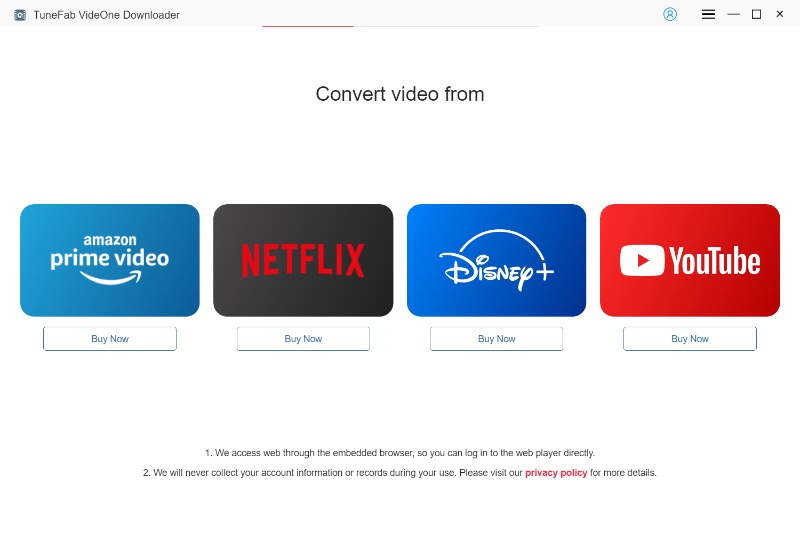
Step 1. Firstly, install TuneFab VideOne Downloader on your computer, and then open the software to enter its Home Screen. Now you can directly paste the URL of the Tumblr video to the search bar.
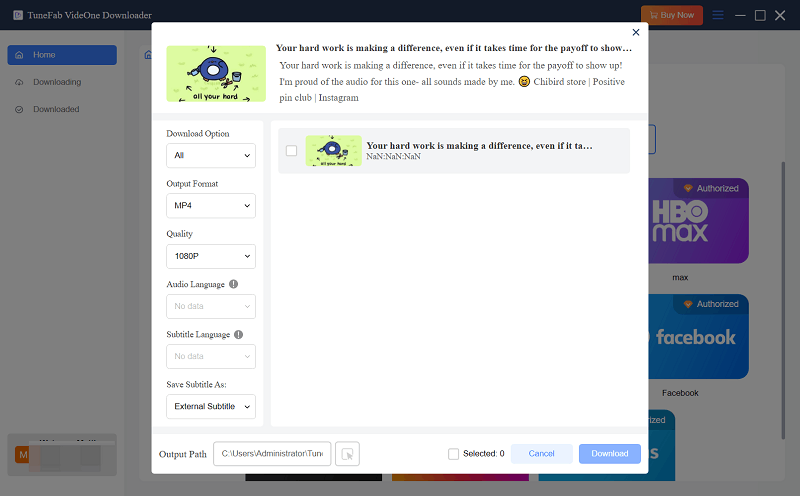
Step 2. Then TuneFab VideOne Downloader will start converting the URL and display downloading options for you. Choose the output format and quality, or even subtitles as you want.
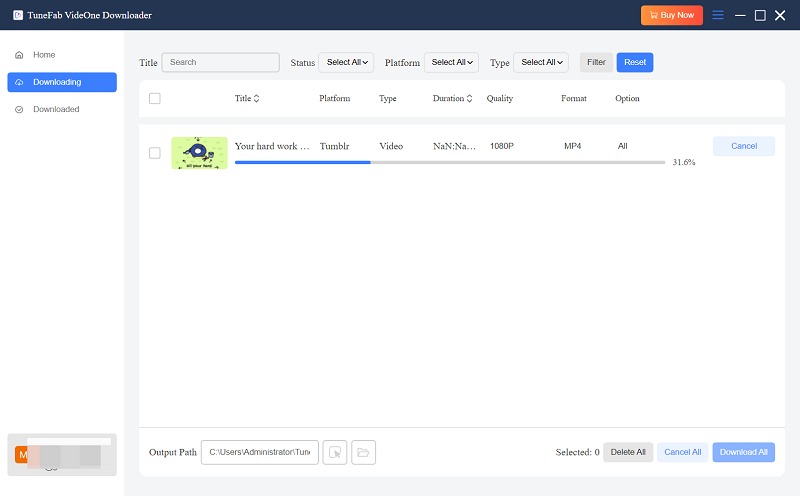
Step 3. Finally, you only need to press the “Download” button, and then TuneFab VideOne Downloader will begin to save the Tumblr video offline immediately.
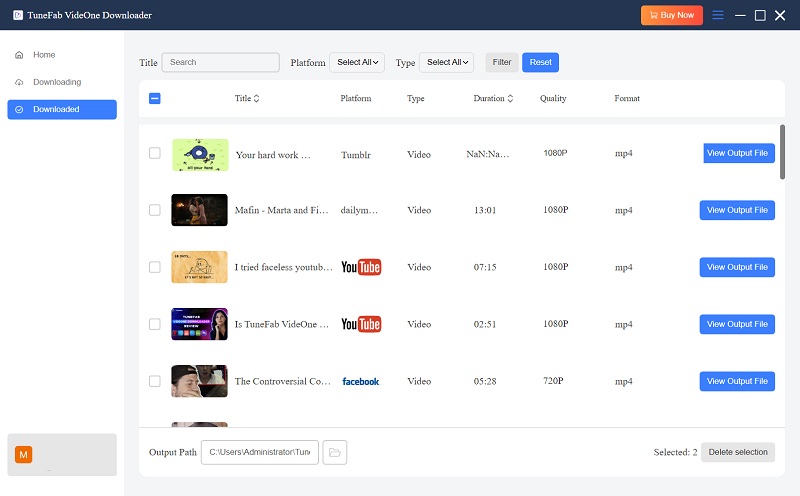
On the Downloaded tab, you can find all your downloads.
Part 2. How to Download Videos from Tumblr Online Without Software
No matter if you are a computer or mobile phone user, a more convenient way to download Tumblr videos can surely be using an online tool.
GetinDevice Tumblr Video Downloader offers the downloading services for several popular media platforms, including Instagram, Facebook, Tumblr, Pinterest, TikTok, and so on. Its downloading operations are also simple – like TuneFab, you only need to prepare URLs, and then GetinDevice will do the rest for you.
Related Article:
In the following, you can also check the steps and see how to use GetinDevice Tumblr Video Downloader to save Tumblr videos offline immediately:
Step 1. To begin with, go to Tumblr and search for the video you want to download. Then copy its URL.
Step 2. Open a new tab in the web browser and go to GetinDevice Tumblr Video Downloader. Paste the URL to the search bar and convert it immediately.
Step 3. Once the conversion finishes, the downloading option will be provided. Just tap it and you can download video from Tumblr offline.

Part 3. Download Tumblr Videos with Chrome Extension
Using a Chrome extension to download videos from Tumblr is also a good idea, as such a method can be really easy and convenient to handle! By installing the Chrome extension, Simple Video Downloader Helper, to your browser, it will automatically detect the video and let you download instantly. Also check the tutorial and use it to download Tumblr videos quickly:
Step 1. Install Simple Video Downloader Helper to the Chrome browser in advance, then open a Tumblr video playback window to play it.
Step 2. Tap the extension icon and select “Links”. From the list, you will find a link with the MP4 suffix. Click it.
Step 3. When the video is opened in a new tab, tap the three-dots icon and select “Download” to save the video offline in MP4.
Part 4. Download Tumblr Videos Free on Android with APKs
Unlike iOS devices, which can be hard to find apps to process Tumblr video download, but only use online tools, Android users can access some free APKs that can work to freely download videos from Tumblr for you stably and with better quality.
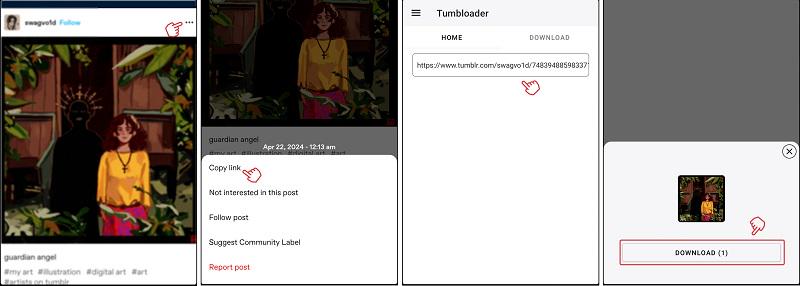
Tumbloader offers very efficient help to convert and download Tumblr videos with only few easy taps. More importantly, its service is entirely free to use! Let’s also follow the operations below to get Tumblr videos downloaded on Android with the help of Tumbloader easily:
Step 1. After installing Tumbloader on your Android device, directly go to the Tumblr application and access the video you want to download.
Step 2. Tap the “Share” button and copy the URL. Then return back to Tumbloader to paste the URL to the search bar.
Step 3. When the video is converted, the “Download” button will be provided to let you download the video from Tumblr immediately!
FAQ About Downloading Videos from Tumblr
Is it legal to download Tumblr videos?
It depends on how the video is used and who owns the content. Downloading Tumblr videos for personal purposes, offline viewing is generally tolerated, especially when the content is publicly available. However, reposting, redistributing, or using downloaded videos for commercial purposes without the creator’s permission may violate copyright laws. Always respect the original creator’s rights and Tumblr’s Terms of Service.
Can I download Tumblr videos on iPhone?
Yes, but not directly through the Tumblr app. iOS does not provide a built-in download option for Tumblr videos. To save Tumblr videos on iPhone, you usually need to use online Tumblr video downloaders via Safari or third-party apps that support link parsing. Keep in mind that iOS system restrictions may limit where the downloaded files are saved.
Can I download HD Tumblr videos?
Yes, HD Tumblr videos can be downloaded if the original upload is available in high resolution. Many Tumblr downloader tools allow you to select video quality before saving. However, if the video was uploaded in a lower resolution, it cannot be upgraded to true HD during download.
In Conclusion
To conclude, as there are lots of helpful tools that can help download videos from Tumblr, no matter if you are using devices like a computer, mobile phone, or a tablet, you can find the appropriate methods to help you do the job.
For desktop users, TuneFab VideOne Downloader can surely be the best option. But for portable devices, online options or free APKs can also bring you cost-saving help! Just choose the one according to your actual needs!