




 Help Center
  Tutorials
  Download Center
 How to Download Pinterest Videos in 4 Ways (Updated)
By Iris Holmes
Updated on Dec 07, 2025
24.2K views
5-min read
“I have saved a bunch of recipe videos on Pinterest. Can I watch them offline? Does anyone know how to download Pinterest videos?”
On Pinterest, you can discover many inspiring images, videos, and GIFs uploaded by global users. However, to download videos from Pinterest for offline viewing, editing, or future reference, you may suffer from a problem – Pinterest doesn’t offer the direct function to download videos offline!
Fortunately, there are still ways to work it out! This article will show you how to download Pinterest videos on PC, Mac, iPhone, Android, or even through online tools. Now, just scroll down and try downloading your favorite videos from Pinterest with any of them! Let’s have a look!
- Way 1. Download Pinterest Videos on Computer Losslessly (Best Method)
- Way 2. Download Videos from Pinterest to MP4 Online (No App Required)
- Way 3. Save Pinterest Videos with Browser Extension (One-click Solution)
- Way 4. Download Pinterest Videos to Mobile Phones with Free Apps (Android & iPhone)
- FAQs About Downloading Pinterest Videos
- Final Verdict: Which is the Best Pinterest Video Downloader?
Way 1. Download Pinterest Videos on Computer Losslessly (Best Method)
Looking for the best way to download Pinterest videos offline without quality loss? TuneFab VideOne Downloader is your go-to choice.
TuneFab VideOne Downloader provides powerful video downloading capabilities, supporting 1000+ sites, including Pinterest, YouTube, Instagram, and more platforms. By getting it, you can download videos from any website directly, more than from Pinterest alone! Even better, this Pinterest video downloader for PC comes with a built-in browser, enabling you to seamlessly browse and download videos from Pinterest to MP4, MKV, or MOV at one stop.
Meanwhile, it can retain the original video quality, up to 4K, ensuring Pinterest video downloads without a watermark. Plus, this tool includes a user-friendly interface with no ads or malware, so you can get started quickly.
Key Features:
- Embeds a web browser to directly find and download Pinterest videos for offline viewing.
- Outputs Pinterest video downloads in MP4, MKV, and MOV.
- Saves output Pinterest videos in lossless quality at up to 4K resolution.
- Speeds up the batch downloading process to 3X or even much faster.
- Saves subtitles and audio tracks in your preferred language when the original sources provide.
- Supports more than 1000+ websites, including Netflix, Hulu, YouTube, TikTok, etc.
Next, let’s check the guide below on how to download Pinterest videos in high quality by using TuneFab VideOne Downloader.
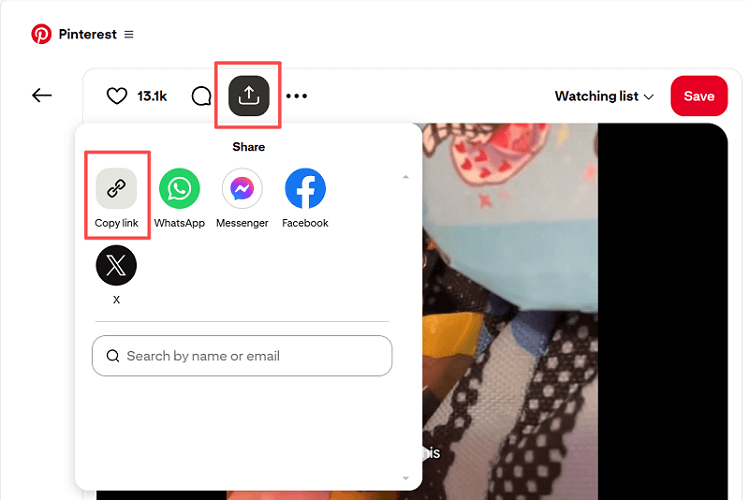
Step 1. Get Pinterest Video Link
Go to the video you want to download from Pinterest. Click on its share icon and choose “Copy link”.
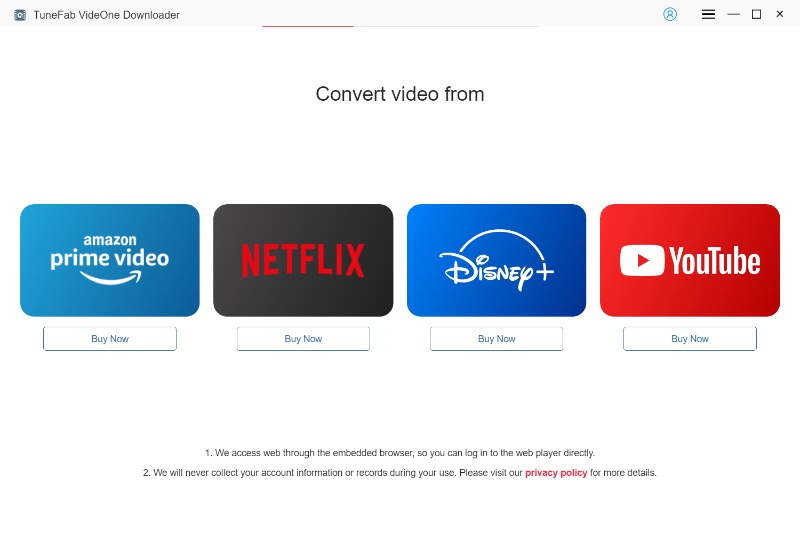
Step 2. Access Pinterest within TuneFab VideOne
Install TuneFab VideOne Downloader on your computer first. Then open the software and directly paste the Pinterest video URL into the search bar. TuneFab VideOne will automatically parse and fetch video information.
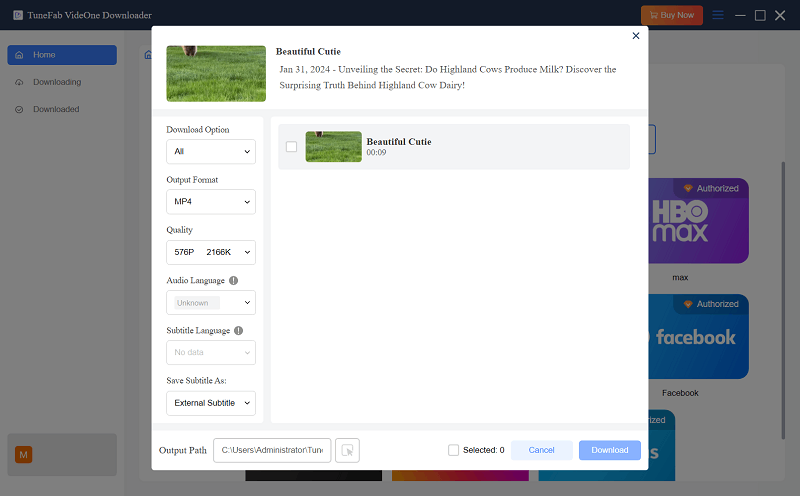
Step 3. Change Output Preferences
When the video is detected, a pop-up window will show up to let you select the downloading options, such as the format (MP4 is recommended) and quality, as you want.
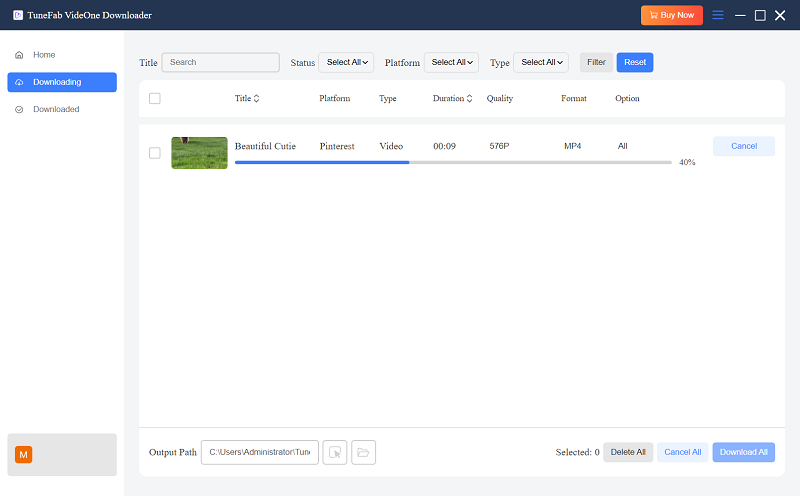
Step 4. Download Pinterest Videos Easily
Simply select the video on the right-hand panel and click the “Download” button to initiate the Pinterest to MP4 download process.
Step 5. Check Your Downloaded Pinterest Videos
After completion, head to the Downloaded tab. You can click “View Output File” to locate the file on your computer, or play it directly within the software without an internet connection.
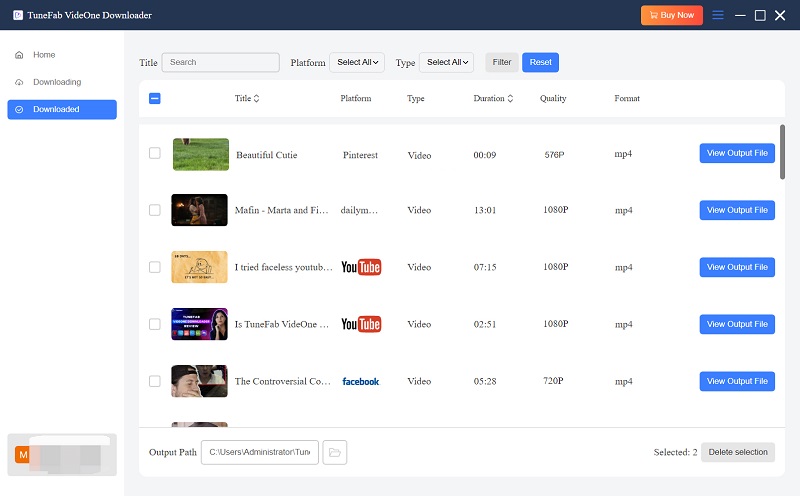
Overall, downloading videos from Pinterest with TuneFab VideOne Downloader is very easy. Additionally, as mentioned above, this downloader supports 1,000 sites, so if you want to download videos from social media, this tool can totally have you covered.
Further Readings:
How to Download Reddit Videos
How to Download Videos from Tumblr
How to Download Videos from Dailymotion
Way 2. Download Videos from Pinterest to MP4 Online (No App Required)
In addition to using desktop software, online Pinterest video downloader tools can deliver greater convenience, especially for those who are using mobile devices. One of the viable options you can try is PinterestVideo, which can help you download Pinterest videos to MP4 for free without installing any apps or extensions.
With it, you can only go to the tool in the web browser, directly paste the URL, and get the Pinterest video download immediately. Now, check the tutorial below and see how it works to help download Pinterest videos online just within seconds:
Step 1. Copy the URL of the Pinterest video first.
Step 2. Go to PinterestVideo on any browser. Then paste the video URL into the search bar.
Step 3. Click “Download” to generate available download options.
Step 4. Choose the “Download” button to convert a video from Pinterest to MP4 online. You can then watch it offline without any hassle.

Important Note.
While online tools offer convenience, they often deliver unstable performance, lower quality, no support for batch downloads, and intrusive ads on the screen. For a better solution, TuneFab VideOne Downloader we’ve mentioned previously, will be more reliable.
Way 3. Save Pinterest Videos with Browser Extension (One-click Solution)
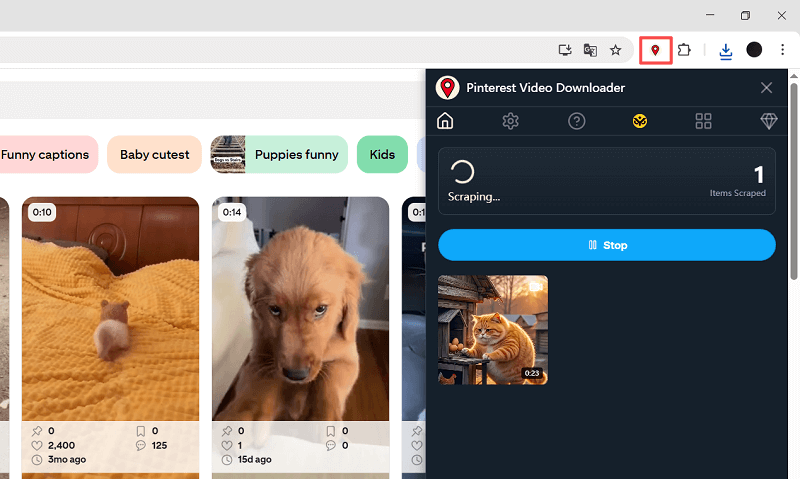
If you prefer an even faster way to save videos from Pinterest without copying and pasting URLs, using a browser extension can be a great solution. A practical option is the Pinterest Video Downloader – Pinterest Image & Video Downloader extension from the Chrome Web Store, which can download all video Pins on any Pinterest board with one click.
Once the extension is added, you can easily download Pinterest videos to MP4 for free offline viewing. Follow the quick guide below to get started:
Note: This extension works on Google Chrome only and may stop working if Pinterest updates its interface. If you need an alternative to download Pinterest videos in bulk, TuneFab VideOne Downloader is worth considering.
Step 1. Install the Pinterest video downloader extension from the Chrome Web Store.
Step 2. Open Pinterest and go to the board that contains your video collection.
Step 3. Click on the extension icon on the toolbar and choose “Scrape Search Results”. Then, it will automatically detect and download videos from Pinterest.
Step 4. If any video is missed, open it individually and download it again from the extension panel.
Way 4. Download Pinterest Videos to Mobile Phones with Free Apps (Android & iPhone)
How about downloading Pinterest videos to your phone and saving them directly to your camera roll or gallery? Read on! Below, we will show you how to download Pinterest videos on Android and iOS devices in high quality.
On Android Devices
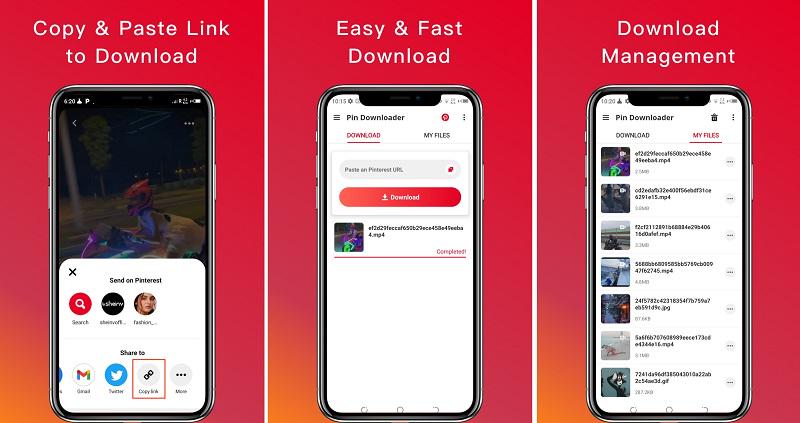
Designed for Android users, a lightweight Pinterest video saver, Video Downloader for Pinterest app lets you save images and videos from Pinterest for free. Follow the steps below to save videos from Pinterest on Android:
Step 1. After getting Video Downloader for Pinterest installed on your Android, open the app.
Step 2. Copy the Pinterest video link and then return to Video Downloader for Pinterest. Once the app detects the copied URL, it will automatically analyze and convert the video from Pinterest to MP4 for you.
Step 3. Simply click the “Download” button to save the Pinterest video offline.
On iPhone/iPad
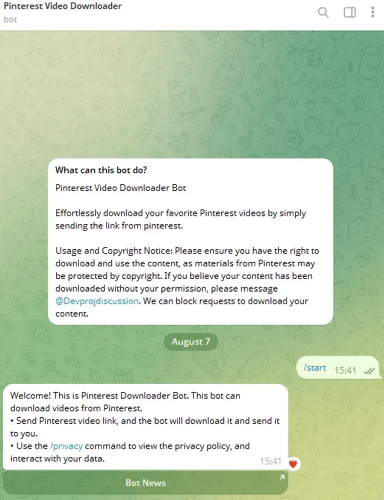
Unlike Android, you can hardly find a Pinterest download app for iOS devices. Fortunately, Telegram bots like @pinterest_downloaderbot come with a hassle-free workaround to download Pinterest videos to iPhone/iPad and save them to your camera roll. Here is how:
Step 1. Open the Telegram app, search for @pinterest_downloaderbot, and then tap “Start” to activate it.
Step 2. On the Pinterest app, head to the target video, tap the share icon, and choose “Copy link”.
Step 3. Send your copied video link to the Telegram bot.
Step 4. The bot will convert Pinterest to MP4 and send the file back. Then, you can easily save the Pinterest video to your Photos app.
FAQs About Downloading Pinterest Videos
Can I download Pinterest videos directly?
No. While Pinterest officially claims that you can download full-screen video Pins via the official app, you will not get a download button if the uploader has set download restrictions. Plus, in our actual testing, it is rare to find a Pinterest video that offers a download button. This is why we strongly recommend using a third-party Pinterest video downloader to get things done.
Why can’t I download videos from Pinterest?
First of all, it should be clear that most Pinterest videos are protected and do not allow direct downloads. If you are still having trouble downloading Pinterest videos using a third-party Pinterest video downloader, it might be due to:
- Poor internet connection.
- Invalid or invalid video link.
- Insufficient storage space on your device.
- The download tool itself is not working. In this case, it is recommended to use professional software like TuneFab VideOne Downloader for stable and smooth performance.
How can I download Pinterest videos without watermark?
The tools mentioned above, such as TuneFab VideOne Downloader, Telegram bot, and Pinterest video downloader extension, can usually capture the original video, meaning you can download Pinterest videos with no watermark. However, if the original video itself has a built-in watermark, then no tool can remove it.
Final Verdict: Which is the Best Pinterest Video Downloader?
This article has guided you through how to download Pinterest videos with 4 effective methods for PC, Mac, Android, iPhone, and more. Overall, it is not a tough task if you have the right tool.
Among them, TuneFab VideOne Downloader is definitely the top choice. It ensures you get 3X faster speed to batch download videos from Pinterest to MP4 in high quality, eliminating all limitations from other options. If you are looking for the best Pinterest video downloader, get TuneFab VideOne and give it a try!