




 Help Center
  Tutorials
  Download Center
 How to Download Niconico Videos to MP4 1080P (4 Methods)
By Iris Holmes
Updated on Dec 07, 2025
25.6K views
5-min read
Niconico is a popular Japanese video-sharing platform with niche Japanese subcultures like Vocaloid, anime, and gaming, being a go-to site for global otaku. However, you may face a challenge: there is no download option. So, how to download Niconico videos for offline viewing?
This guide has got you covered! We will walk you through 4 easy and effective methods to download Nicovideos to MP4 1080P, so you can watch them anytime, anywhere – without interruptions. Let’s scroll down now and pick the right tool to help you download Nicovideo you love in the best possible quality!
Related Article:
How to Download Video from Social Media (4 Useful Ways)
How to Download Video from Bilibili to MP4 with Sound
- Way 1. Download Videos from Nicovideo to MP4 1080P with Desktop Niconico Video Downloader
- Way 2. Save Niconico Douga Videos Online without Software
- Way 3. Download Niconico Videos to MP4 with Browser Extension
- Way 4. Record Niconico Video LiveStreams with OBS Studio
- FAQs About Downloading Niconico Videos
- Conclusion
Way 1. Download Videos from Nicovideo to MP4 1080P with Desktop Niconico Video Downloader
For the best video quality and a seamless downloading experience, using a desktop downloader is often the most effective choice. Not only do they support a wide range of video formats and resolutions, but they also provide a convenient and high-quality solution for users who want to download Nicovideo effortlessly. TuneFab VideOne Downloader stands out as the best choice.
TuneFab VideOne Downloader is a powerful and versatile video downloading software available for both Windows and macOS. This tool supports downloading videos from not only major streaming platforms but also over 1000+ websites, including Niconico. This makes it one the best way to save anime, live streams, music videos, and more from Niconico to PC.
With a user-friendly interface, it allows you to download Niconico videos in various formats such as MP4, MKV, and MOV, and supports original high-quality downloads up to 1080P resolution. Whether you’re looking to download a single video or batch download Niconico channel videos, this tool is a great choice. If you want a fast, reliable, and high-quality solution to download video from any website, TuneFab VideOne Downloader is always ready to help.
Key Features of TuneFab VideOne Downloader:
- Supports downloading videos from Niconico in MP4, MKV, and MOV formats for high flexibility.
- Offer options to get Niconico video downloads in MP3, M4A, WAV, and FLAC.
- Ensures the highest possible video quality, with support for up to 1080P resolution.
- Provides batch conversion speeds 3X or faster with stable performance.
- Download Niconico videos with subtitles in 3 different types when available.
- Supports various websites such as OTT platforms like Netflix and Hulu; other social media services like TikTok and Instagram.
To download Niconico video to MP4 1080P with TuneFab VideOne Downloader, follow these simple steps.
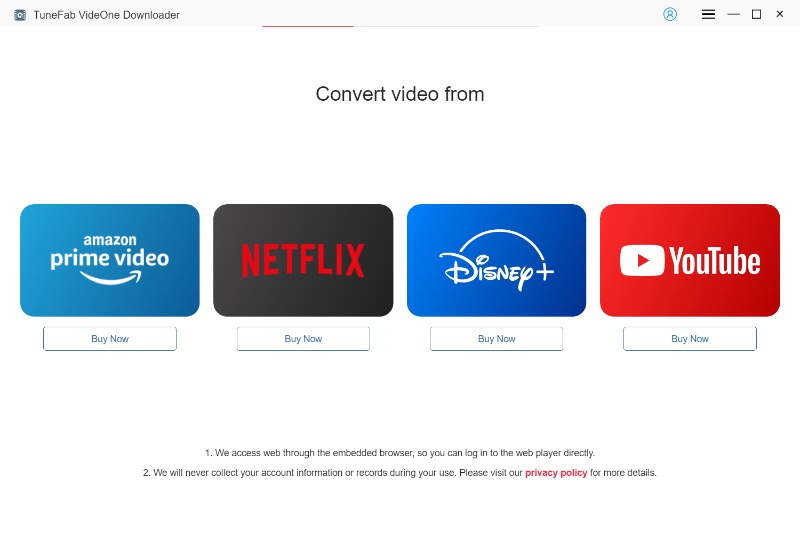
Step 1. Copy and Paste Niconico Video URL
Go to the Niconico website and find the video you want to download. Copy the URL from the address bar of your browser. In the TuneFab VideOne Downloader interface, paste the copied Niconico video URL into the search box, find the video and add it to the converting list.
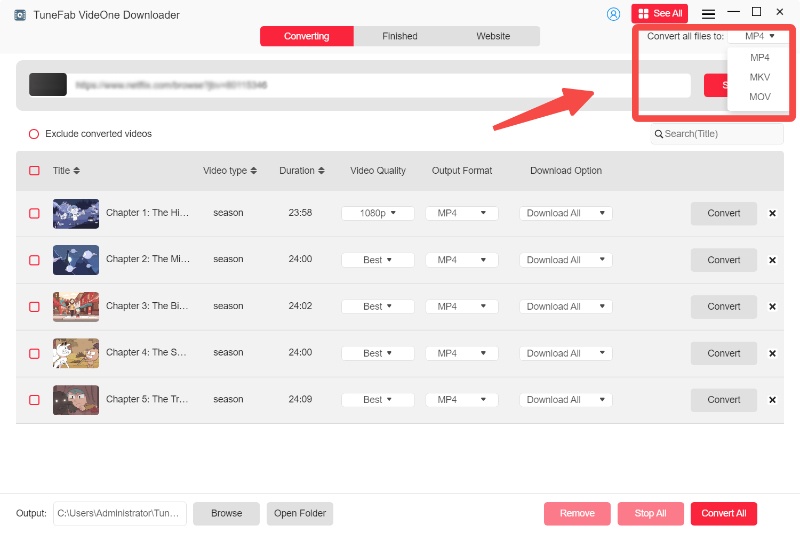
Step 2. Select Output Settings
Choose your preferred video format (MP4, MKV, or MOV) and select the resolution you want. Once done, select the video and click the “Download” button to get started.
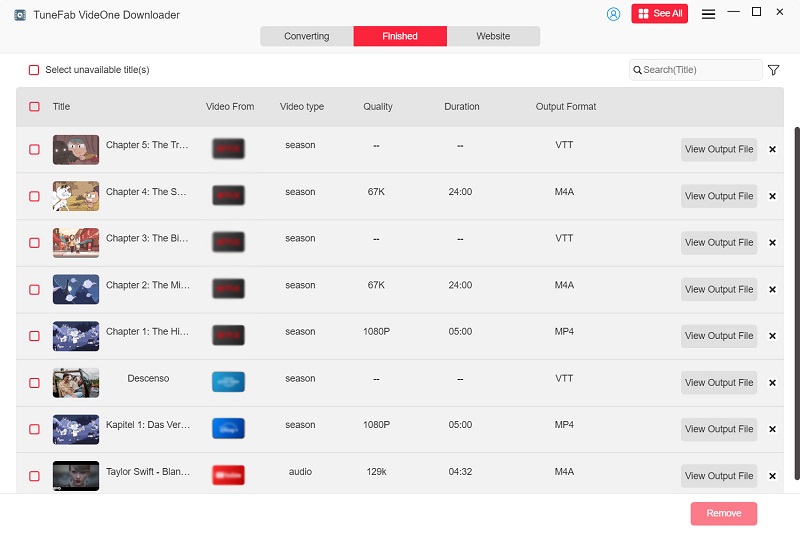
Step 3. Get Niconico Videos Downloads in MP4
When all Niconico videos have been downloaded, go to the “Downloaded” section and click the “View Output File” button to access Niconico 1080P downloads on your computer.
Way 2. Save Niconico Douga Videos Online without Software
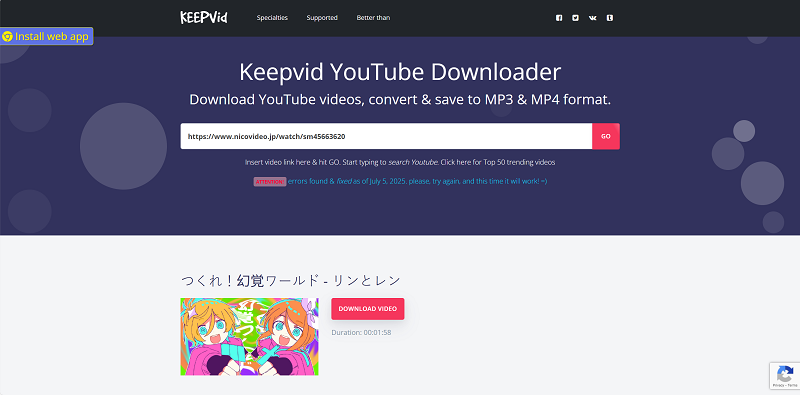
If you prefer a quick and hassle-free way to download Niconico videos without installing any software, using an online tool might be the perfect solution. Websites like KeepVid provide a convenient and efficient Niconico video downloader online.
KeepVid is a simple platform that lets you download Niconico video in MP4 format online for free with just a few clicks. There are no subscriptions or hidden fees, and the interface is straightforward enough for beginners. So, it can be a viable choice if you want to download a few high-quality Niconico videos quickly without installing a desktop tool.
Although online free Niconico downloaders like KeepVid are convenient, they often come with limitations such as slower download speeds, lower resolutions, and a lack of batch downloading, ads, or pop-ups. For a more robust and feature-rich experience, TuneFab VideOne Downloader is the better choice.
Here is how to download Niconico videos online with KeepVid:
Step 1. Visit Niconico and find the video you want to download. Copy the URL from the address bar of your browser.
Step 2. Navigate to the KeepVid download page and paste the copied URL into the box.
Step 3. Choose a preferred MP4 download option from the list.
Step 4. Click the “Download” button to start downloading Nicovideo, and the video will be saved in MP4 format on your device.
Way 3. Download Niconico Videos to MP4 with Browser Extension
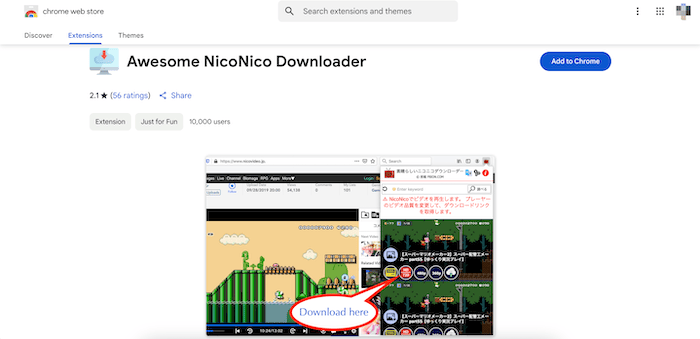
Want an even more streamlined way to download Niconico videos directly from your browser? Using a browser extension like Awesome Niconico Downloader can be a great option. It eliminates the need to copy and paste URLs or use external tools, offering a quick and seamless solution to download embedded videos on the website.
This Niconico video downloader extension integrates with Chrome and Firefox to ensure a smooth process, perfect for those looking for a quick way to grab their favorite video without leaving the Niconico page. This means you can easily save Niconico videos to MP4 in HD with one single click.
Tip: While the extension is convenient, it may not offer the best performance for frequent or full Niconico playlist downloads. For users looking for a more powerful tool with enhanced features like faster speeds, higher resolutions, and batch downloading, TuneFab VideOne Downloader is highly recommended.
Here are the steps on how to download Niconico videos on Chrome with Awesome Niconico Downloader:
Step 1. Go to the Awesome Niconico Downloader Extension page on the Chrome Web Store and click “Add to Chrome” to install the extension.
Step2. Once the extension is installed, open Niconico and find the video you want to download.
Step 3. Click the Awesome Niconico Downloader icon in your browser’s toolbar while on the video page, and Select MP4 as the format for the video download.
Step 4. Click the download button, and the video will begin downloading in MP4 format, saving it directly to your device.
Way 4. Record Niconico Video LiveStreams with OBS Studio
Using a screen recorder is also a popular solution for ripping videos from Niconico. This enables you to record Niconico live streams, channel videos, or anime as they play and save them in MP4 or other common formats while preserving up to 1080P high quality.
The free and open-source OBS Studio is one of the most widely used options. It supports HD recording and is capable of capturing anything displayed on your computer screen, without relying on a third-party Niconico video downloader.
Note:
This method does have limitations. You must record the entire video in real time, which is time-consuming. Plus, it does not support downloading Niconico videos or Niconico playlists in batches, so it is less efficient for handling a large collection than professional download tools like TuneFab VideOne Downloader.
To learn how to get HD Niconico video downloads in MP4 for free on your PC with OBS Studio, follow the detailed steps below:
Step 1. Go to the Niconico website, and select the live stream or video you want to record.
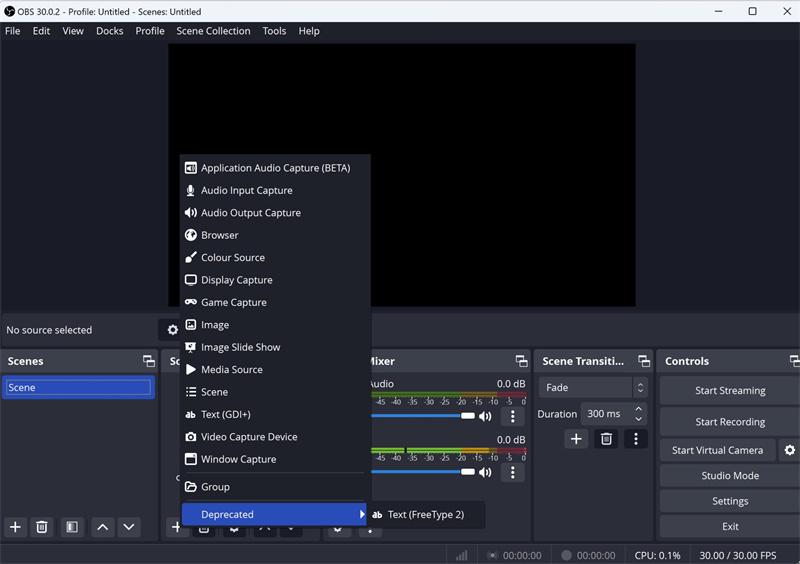
Step 2. Launch OBS Studio. In the “Sources” area, click the “+” and select “Display Capture” or “Window Capture” to capture the Niconico playback window.
Step 3. Name the pop-up window. OBS will automatically detect and select the correct Niconico playback page for full-screen capture.
Step 4. Go to “File” > “Settings” > “Output” > “Recording”. Then, set your preferred format (MP4 recommended), resolution (e.g., 1080P), and frame rate.
Step 5. Return to the Niconico and start playing the video. Then, click the “Start Recording” button in the “Controls” panel. Once the video is finished, click “Stop Recording” to save the Niconico video to your PC for offline viewing or further editing.
FAQs About Downloading Niconico Videos
Q1. How to download MP3 from NicoNico?
If you aim to extract music or audio from Niconico videos, you will need a Niconico video downloader that supports audio-only output.
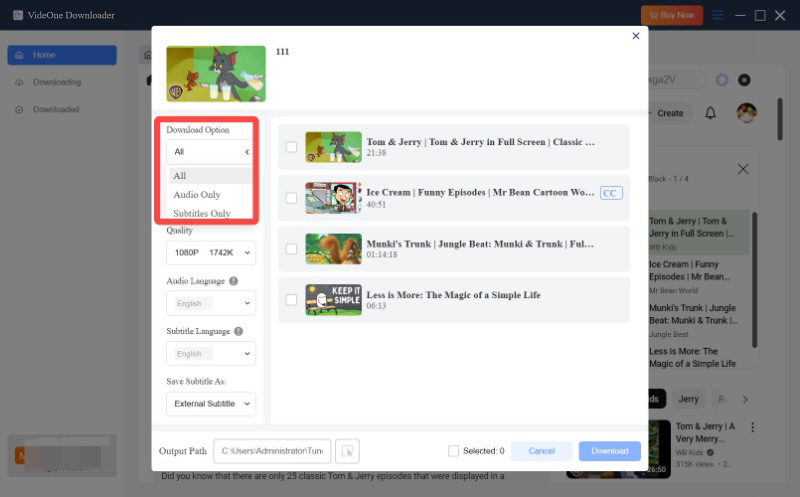
TuneFab VideOne Downloader is a viable helper. You can simply switch the “Download Options” to “Audio Only” in the output window and select MP3 as your format. Then, click “Download” to get your Niconico video download in MP3 format.
Q2. How to download deleted Niconico videos?
First of all, it is important to understand that once a video is deleted by the uploader or removed from the Niconico website, you will no longer be able to download it.
Therefore, if you come across a douga, live stream, or any video you really enjoy, it is highly recommended to save it to your device beforehand using Niconico Video Downloader to avoid losing access to valuable entertaining treasures.
Q3. How to watch Niconico videos outside Japan?
For users outside Japan, some Niconico content may be unavailable due to regional restrictions. In this case, using a VPN or proxy server allows you to bypass geo-blocks and watch Niconico videos. If you want to watch them offline, you can also use tools such as TuneFab VideOne Downloader to download Niconico videos as MP4. This way, you can enjoy Niconico 1080p downloads and watch your favorite anime, live streams, or music anytime, without any restrictions.
Conclusion
In this article, we have guided you through how to download Niconico videos with 4 popular methods, including using a desktop downloader, an online tool, a browser extension, and a screen recorder.
By comparison, the desktop option, TuneFab VideOne Downloader, is the top choice for those seeking the best overall experience. It provides fast download speeds, high-resolution support, and additional features like batch downloading and subtitle selection, making it the most reliable and comprehensive solution for downloading Niconico to MP4 in 1080P. Let’s download it today and give it a try!