




 Help Center
  Tutorials
  Download Center
 How to Download Private Vimeo Video in 2026 (5 Tested Ways)
By Iris Holmes
Updated on Jul 26, 2026
25.8K views
5-min read
Q: Can I download a private Vimeo video directly for offline viewing?
A: Yes, but it depends on how the video owner has shared it. A private Vimeo video may be shared only with specific people, protected by a password, hidden from Vimeo search, or embedded on a private website.
In this guide, we will show you 5 tested ways to download private Vimeo videos in 2026, explain how each method works, and compare their performance, success rate, and best use cases so you can choose the right solution quickly.
For quick answers, check the comparison table below to find the best option for your situation.
| Method | Output Quality | Ease of Use | Best For | Key Limitations |
|---|---|---|---|---|
| Official Download | Same as upload | Easy | Your own uploaded private videos | Only works for videos you uploaded yourself. |
| TuneFab VideOne Downloader | Up to 4K | Easy | Any private video you have a link to (including password-protected) | Paid software, and the free version is limited to 3 videos per day within 10 days. |
| Vimeo Video Downloader Plus Chrome Extension | Up to 4K | Easy | Private videos with no password required | May stop working suddenly and have limited support for private videos. |
| Inspect Element | Up to 1080P | Complex | Embedded private videos on webpages | Not applicable for every user, offering a high failure rate on HLS/DASH streams. |
| yt-dlp | Varies by the source | Complex | Any private video from Vimeo | Require technical knowledge and deliver occasional download failures during testing. |
Disclaimer: Before downloading private Vimeo videos, ensure you have permission from the copyright holder.
- Before You Start: Find the Correct Vimeo Video URL
- Method 1. Download Your Own Private Vimeo Videos (Official Way)
- Method 2. Batch Download Vimeo Private Videos to MP4 via TuneFab VideOne
- Method 3. Download Private Vimeo Videos from a Shared Link via Chrome Extension (Limited Support)
- Method 4. Download Embedded Private Vimeo Videos via Inspect Element
- Method 5. Download Vimeo Password-Protected Videos via yt-dlp (Advanced)
- FAQs About Downloading Private Vimeo Videos
- Final Verdict: Which Method Should You Choose?
Before You Start: Find the Correct Vimeo Video URL
To download a private Vimeo video, the first step is to obtain the correct video link. The URL in your browser’s address bar is usually just the playback page link, not the direct video source link. Follow these steps to get the correct URL:
- Open the private video on Vimeo.
- Click on the share icon and navigate to the Embed section.
- Copy the link within the embed code, which will look like this: https://player.vimeo.com/video/(Video ID)
Once you have the correct link, you can use it to get your Vimeo private video downloads with ease.
Method 1. Download Your Own Private Vimeo Videos (Official Way)
If you upload the video yourself, this is the safest, most straightforward, and most legal method. Vimeo officially allows creators to easily download their own video content on computer and phone. Below are the step-by-step instructions for both platforms.
Tip. To download private Vimeo videos uploaded by other creators, go directly to Method 2.
On Computer
Here’s how to download your own private Vimeo videos on the computer.
Step 1. Log in to your Vimeo account and go to Home.
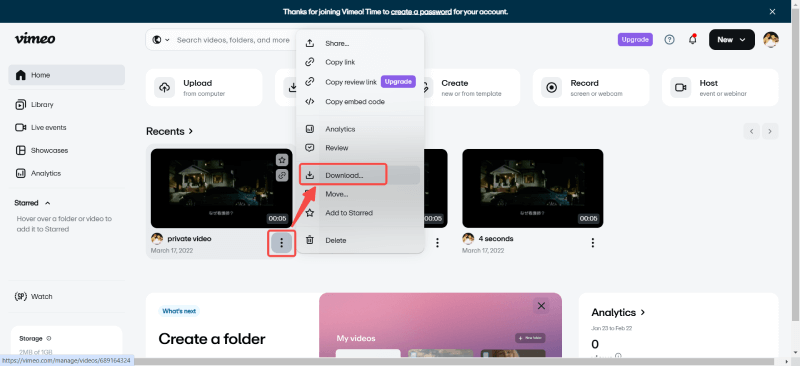
Step 2. Find the private video you want to download, click on the three dots icon to expand the options menu in the lower right, and select Download.
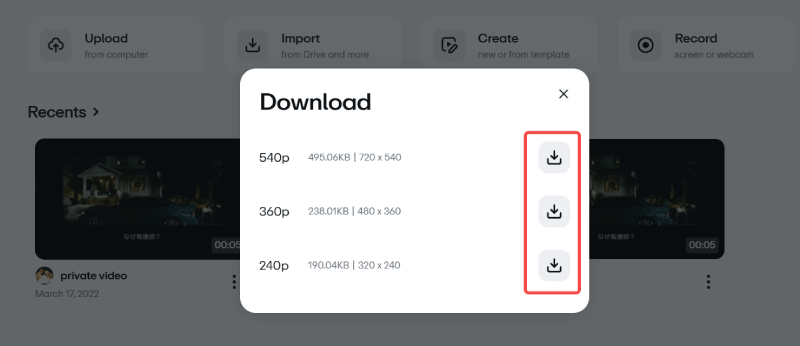
Step 3. Choose your preferred video quality, then click the download button behind the quality option. The video will start downloading the Vimeo private video to your computer immediately.
On iOS & Android Devices
Here are the steps on how to download private Vimeo videos on Android/iOS devices.
Step 1. Open the Vimeo app on your phone and sign in to your account.
Step 2. Locate your private video and tap the three dots menu.
Step 3. Click Save, then Save to Camera Roll to download a private video on Vimeo as an MP4 file to your phone’s Gallery.
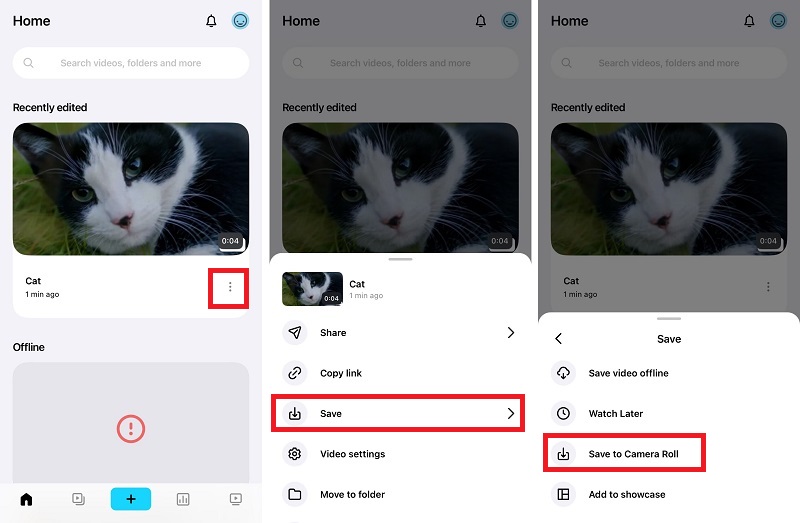
Note: If you select Save video offline in the third step, the video will be saved within the Vimeo app for offline viewing instead of appearing in your Camera Roll or Gallery.
This method only works for videos you uploaded yourself. If you need to download a Vimeo private video shared by someone else, proceed to Method 2 for reliable third-party tools.
Method 2. Batch Download Vimeo Private Videos to MP4 via TuneFab VideOne
Important Note.
- This method is intended for videos you have permission to download.
- Actual download speed and success rate are subject to real-world testing conditions, Vimeo’s platform restrictions and the video’s privacy settings.
If you need to save multiple authorized private Vimeo videos with shared links for offline viewing or backup, using a dedicated video downloader can be a more convenient option than manually extracting video files.
During our hands-on testing, TuneFab VideOne Downloader is a strong choice for Windows and Mac. We tri,ed it different Vimeo video links, including private videos with a password and found that it could parse the video URL and convert videos in common formats such as high-quality MP4. Our 2-minute private video from Vimeo was downloaded in about 30 seconds.
Verified Advantages From Our Hands-On 2026 Testing:
- Simple and easy to use with built-in web browsers.
- Save private Vimeo videos in MP4, MKV, and MOV formats for permanent offline viewing.
- Maintain original video quality in up to 4K resolution.
- One click to batch download Vimeo videos with stable 3X accelerated speeds.
- Download videos from any website, including Vimeo, TikTok, Instagram, etc.
Plus, TuneFab VideOne Downloader has a clear and intuitive interface, making it easy to use. Next, let’s see how to download private Vimeo videos from a link with it.
Step 1. Get TuneFab VideOne Downloader Ready
Download and install TuneFab VideOne Downloader on your Windows or Mac PC.
Step 2. Copy and Paste Private Vimeo Video Link
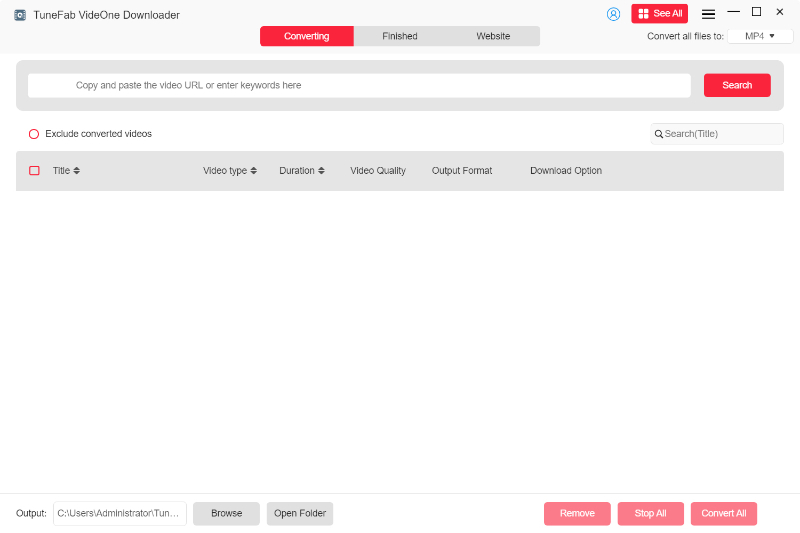
Navigate to the Vimeo private video you want to download, then copy the correct URL. Then, paste it into the search field in TuneFab VideOne. If the video you are downloading contains a password, you will be asked to enter the password so that the downloader can access the video.
Step 3. Select Output Format and Quality
Once the video is parsed, you will see a pop-up window, letting you select the desired output format (MP4, MKV, MOV) and quality.
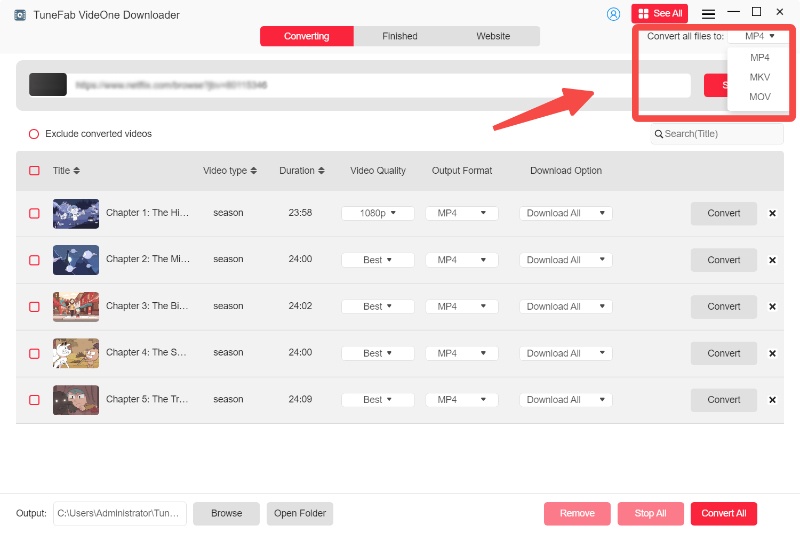
Step 4. Download Private Vimeo Videos
Select the video and click Download at the bottom right to start downloading private Vimeo video.
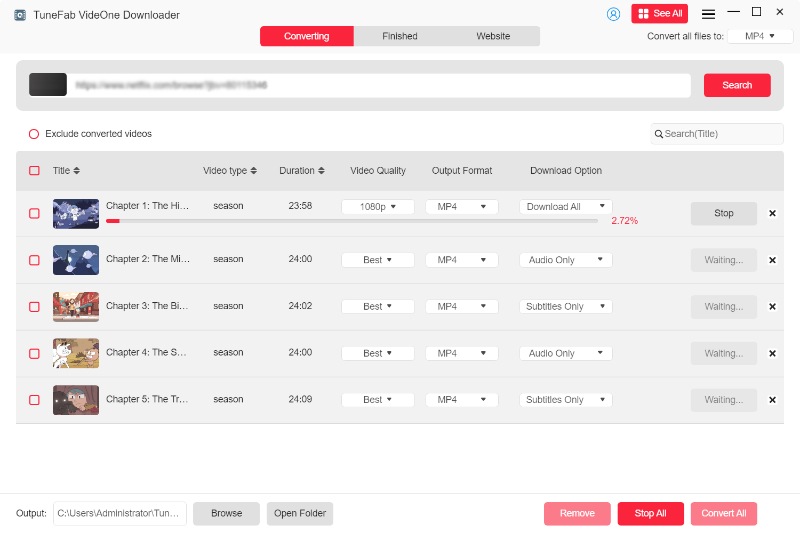
Step 5. Access Private Vimeo Video Downloads
The private Vimeo videos will be finished downloading and saved to your computer. Go to the Downloaded tab and click View Output File to access the local files.
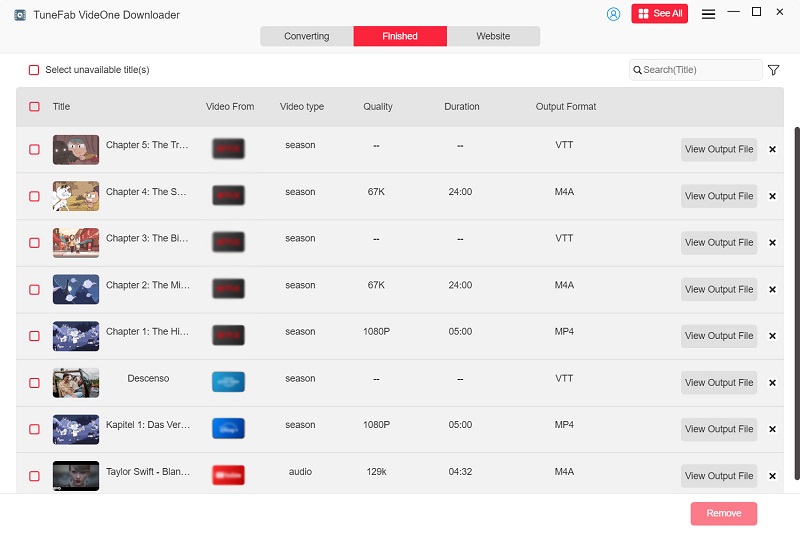
Further Readings:
How to Download Private Instagram Videos
How to Download Private Facebook Videos
How to Download Private TikTok Videos
Method 3. Download Private Vimeo Videos from a Shared Link via Chrome Extension (Limited Support)
If you only need to save an occasional private Vimeo video that you already have permission to watch, a Chrome extension can be a quick option without installing desktop software. For this method, we tested Vimeo Video Downloader Plus, a Chrome extension designed to detect downloadable Vimeo video sources directly from the browser.
In our testing, it worked better with shared private videos with open viewing permissions. It failed to parse password-locked and login-required Vimeo private content.
Note. Google Chrome frequently delists third-party video download plug-ins, so this method is not recommended for long-term or frequent use.
If you choose to try this method, follow the steps below to learn how to download private Vimeo videos via a Chrome extension.
Step 1. Add the Vimeo Video Downloader Plus extension to your browser from the Chrome Web Store.
Step 2. Open the private Vimeo video you want to download.
Step 3. Click on the extension icon floating on the video player and select a desired resolution. Then, you can easily save a private video from Vimeo to your local folder.
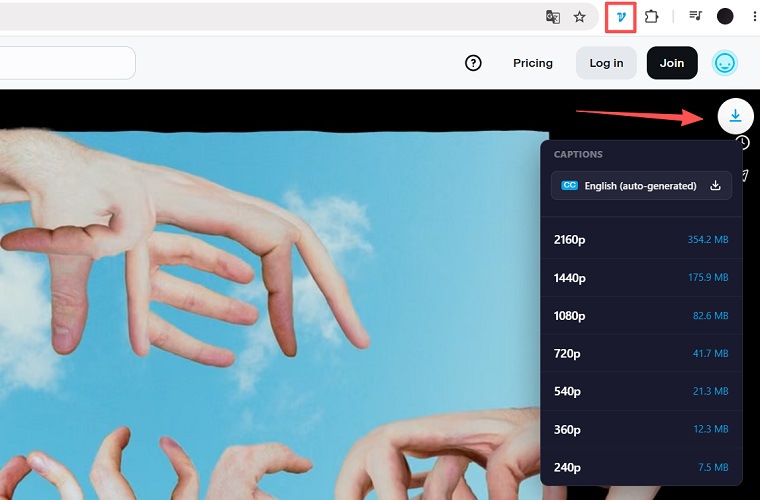
Method 4. Download Embedded Private Vimeo Videos via Inspect Element
⚠ 2026 Update: Vimeo performed a significant backend update in late 2025. As a result, older methods that relied on locating direct video URLs in page source code may no longer work consistently. Instead of finding .mp4 links, you may only see JSON files. This method is now less reliable than dedicated download tools.
When a Vimeo video is embedded on a webpage, you usually can’t see the direct video URL, making the download process a bit tricky. In this case, you can try using your browser’s built-in developer tools to locate the video source and save a Vimeo private video as an MP4 file.
Note that this method is much more complex than using a dedicated Vimeo private video downloader like TuneFab VideOne Downloader.
Please follow the steps below carefully (using Chrome as an example) to learn how to download private Vimeo videos embedded on a webpage:
Step 1. Open the website containing the desired private Vimeo video in your browser.
Step 2. Right-click anywhere on the page and select Inspect to open the browser’s Developer Tools panel.
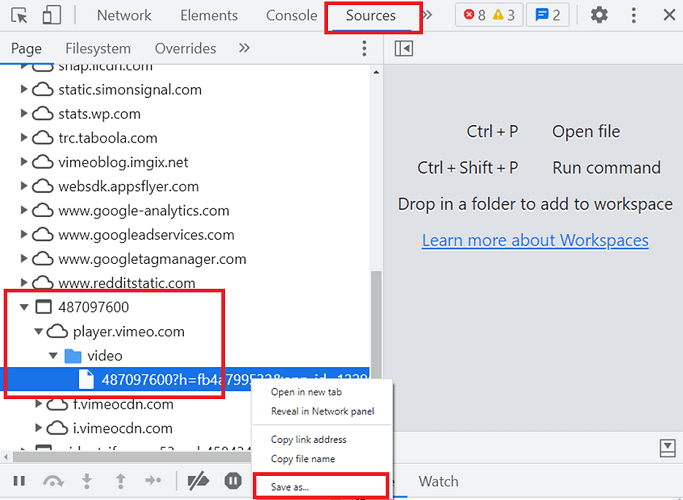
Step 3. Switch to the Sources tab. If no files are displayed, refresh the video page to reload.
Step 4. In the right-hand navigation panel, look for a folder named with 9-digit numbers containing all the URLs. Open it and select player.vimeo.com > Video. Again, if you still see nothing, refresh again.
Step 5. Right-click the link in the video folder and select Save as… to save it as a TXT file that can be opened in a text editor.
Step 6. Open the TXT file and press CMD+F (Mac) or Ctrl+F (Windows) to initiate the search feature.
Step 7. Type the video quality you want (e.g., 1080P) to locate the corresponding link. Look for a URL ending with .mp4.
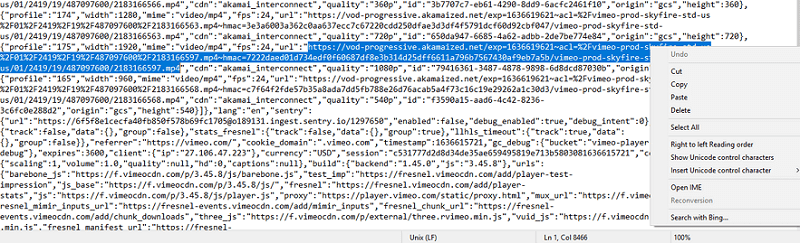
Step 8. Copy the link and access the video in your browser.
Step 9. Play the video for a few seconds, then right-click and select Save video as…. Click Save, and you will successfully download the Vimeo private video as a high-quality MP4 file.
Method 5. Download Vimeo Password-Protected Videos via yt-dlp (Advanced)
For advanced users who prefer a command-line solution, yt-dlp is a powerful open-source tool that allows you to download videos from various websites, including Vimeo. It is compatible with Mac, Windows, and Linux, making it a flexible choice for users comfortable running commands in the terminal or Command Prompt. If you want to save Vimeo private videos efficiently and directly to your computer, follow the steps below.
Note. In our hands-on testing, yt-dlp had the steepest learning curve. Additionally, some private Vimeo videos can not be downloaded. We tested five videos, but only two were downloaded successfully.
Step 1. Install yt-dlp and FFmpeg on your computer.
Windows:
- Download the latest yt-dlp.exe from the official GitHub release page. Then, place the file in an easy-to-access folder.
- Move the ffmpeg.exe to your yt-dlp directory.
Mac/Linux:
- Get Homebrew installed first. Then, run brew install yt-dlp on Homebrew.
- Run the command line to install FFmpeg: brew install ffmpeg

Step 2. Run the correct yt-dlp command lines.
- Password-protected video: –video-password (PASSWORD)
- Embedded video: –referer “link”
For example, to download a password-protected Vimeo video to MP4, run the line:
yt-dlp –video-password (PASSWORD) –merge-output-format mp4 “https://player.vimeo.com/video/XXXXXXXXX”
FAQs About Downloading Private Vimeo Videos
Is it legal to download private videos from Vimeo?
It depends. If you are the video owner, or if the video owner has granted you download permission, then downloading private Vimeo videos in MP4 for personal viewing and not for distribution is generally allowed. Otherwise, downloading without permission may violate copyright laws and Vimeo’s terms of service.
Is there a free online private Vimeo video downloader available?
As of July 2026, most free online tools do not support private Vimeo videos. We tested several so-called online Vimeo private video downloaders, but none of them worked. When we clicked on the download button, they often turned out to be a redirect for desktop software installation. Not to mention, free online tools usually come with ads, malware, and data privacy concerns, posing security risks.
Can the video owner see if I download a private Vimeo video?
Yes, it can happen. If you use the official download button provided by the video owner on the Vimeo playback page, Vimeo will log your action in the creator’s analytics. The video owner can see how many times the file has been downloaded.
However, if you use a third-party tool like TuneFab VideOne Downloader to deal with Vimeo private video downloads, your action will not be tracked by Vimeo, and the video owner will not be notified.
Final Verdict: Which Method Should You Choose?
The best way to download a private Vimeo video depends on how often you need to download videos and the type of Vimeo content you are trying to save. Here is a quick summary based on different situations:
- You own the video: use Vimeo’s native download.
- Occasional video download with no password: Chrome extension.
- Password‑protected, everyday user: TuneFab VideOne Downloader.
Overall, for most users who frequently need to save private Vimeo videos for offline viewing or backup, a desktop downloader like TuneFab VideOne provides a more convenient experience. However, if you only need a one-time download, Vimeo’s built-in options or browser-based methods may be enough.